
Image



DrupalCon Europe 2026 Rotterdam — Technical Blog Series | Post #1 of 10
Published as part of the "Drupal in Rotterdam" technical series ahead of DrupalCon Europe 2026, taking place 28 September – 1 October at Postillion Hotel & Convention Centre WTC Rotterdam.
For years, the Drupal onboarding experience looked the same: install core, hunt for contributed modules, manually enable features, export configuration, repeat. Installation profiles and distributions tried to solve this, but they were rigid, opinionated, and notoriously painful to maintain over time.
That era is over.
Drupal CMS 2.x released on 28 January 2026 and described by the Drupal Association as the biggest evolution in the platform's 25-year history fundamentally rewrites the site-building playbook. The engine behind it is Recipes: a composable, YAML-driven system for packaging and applying discrete units of functionality to any Drupal site, at any point in its lifecycle.
By the time DrupalCon Rotterdam opens in September 2026, Recipes will be the dominant site-building paradigm in the Drupal ecosystem. This post is your technical foundation.
Before Drupal CMS, when you needed a blog on a Drupal site you would install a contributed theme, wire up a content type, create a view, configure URL aliases, set up metatags — at least a dozen manual steps. If you wanted to replicate that setup on a second site, you either exported configuration (hoping it was portable) or started over.
Drupal Recipes solve this with a single command.
A Recipe is a collection of YAML files that declares:
The key architectural insight: recipes are additive and idempotent by design. You apply them to an existing site without overwriting unrelated configuration. Two recipes can independently add functionality without conflicting — something distributions could never reliably do.
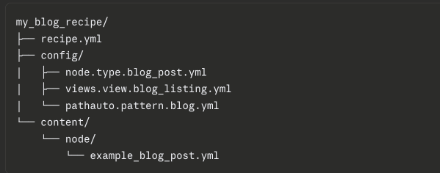
A minimal recipe lives in its own directory and requires exactly one file: recipe.yml.
Here is a simplified recipe.yml for a blog feature:
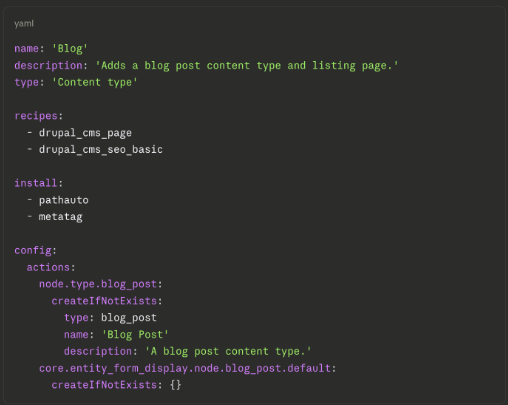
recipes key — recipes compose other recipes. The drupal_cms_page and drupal_cms_seo_basic dependencies are applied first, guaranteeing their configuration is present before your recipe runs. This is the composability that distributions lacked.
config.actions — rather than shipping raw config YAML files (which installation profiles do), recipes use config actions like createIfNotExists, ensure, or setValues. This means a recipe will not clobber a field or content type that already exists on the target site.
No update path — this is the current limitation. Recipes do not have update hooks. Applying a recipe to an existing site that already has some of its configuration will not "re-apply" or update that config. Plan accordingly.
Drupal CMS 2.x is itself a curated collection of recipes layered on top of Drupal Core 11.3. Installing it gives you a production-capable baseline without writing a single line of custom code.
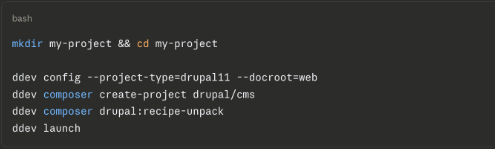
The drupal:recipe-unpack step is important — it resolves and unpacks the recipe dependency tree before Drupal installs, ensuring all required configuration files are available to the installer.
Out of the box, Drupal CMS 2.x ships with a curated set of recipes covering the most common site-building needs:
|
Recipe |
What It Provides |
|
drupal_cms_blog |
Blog post content type and listing view |
|
drupal_cms_page |
Basic page content type |
|
drupal_cms_seo_basic |
Metatag, Pathauto, XML Sitemap |
|
drupal_cms_image_media |
Responsive images, focal point, SVG support |
|
drupal_cms_anti_spam |
CAPTCHA, honeypot |
|
drupal_cms_google_analytics |
GA4 + GTM integration |
|
drupal_cms_ai |
AI alt-text generation, admin chatbot |
|
drupal_cms_search |
Search API + Solr-ready configuration |
You apply any of these via the Project Browser in the admin UI, or via Drush on the command line:

Drupal CMS 2.x introduces Site Templates — a concept built on top of the Recipe system. Think of a site template as a recipe that provides an opinionated, near-complete starting point for a specific use case, including a theme, example content, and pre-wired integrations.
The first template shipped with Drupal CMS 2.0 is Byte — a dark-themed marketing site preconfigured for SaaS products, with a blog, newsletter signup, pricing pages, and a contact form. It installs in under 3 minutes and is built entirely on Drupal Canvas components.
A second Blank template was added in Drupal CMS 2.0.1 — a zero-content blank slate with Canvas included but no predefined content model, intended as the starting point for teams building their own templates.
|
Recipe |
Site Template |
|
|
Scope |
Single feature |
Full site starting point |
|
Contains theme? |
No |
Yes |
|
Example content? |
Usually no |
Yes |
|
Applies to existing sites? |
Yes |
New installs only (recommended) |
|
Built on Recipes? |
Is a recipe |
Yes, composed of recipes |
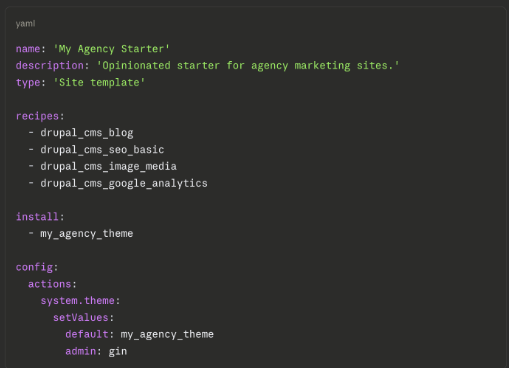
The Drupal Association provides a Site Template Starter Kit for teams that want to create reusable templates. A custom template is a recipe with a site_template type declaration and a bundled theme:
You can then export an existing Drupal CMS site as a template using the Drush command added in recent releases:

Recipes define structure. Drupal Canvas — the new default editing experience introduced in Drupal CMS 2.0 — defines presentation.
Canvas is a true drag-and-drop page builder with live preview and real-time editing, powered by the Mercury component library. Common building blocks — heroes, cards, testimonials, accordions, pricing grids are available as Mercury components.
The relationship between recipes and Canvas is deliberate. When a recipe creates a content type, Canvas provides the visual expression of that type's fields and layout. The two systems are designed to be used together:
Technical note: Canvas requires a component-based theme. The shipped Mercury theme is the reference implementation. If you have existing sites on Layout Builder or Paragraphs, migration paths are planned but not yet available as of mid-2026. The recommended approach is a phased migration or greenfield Canvas adoption for new projects.
Let's walk through adding a full blog to an existing Drupal CMS site, no admin UI clicks required.
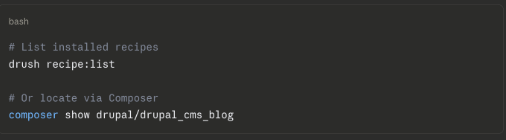

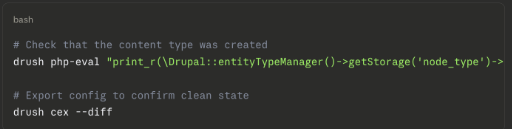
Drush will:
You don't modify a community recipe's files. Instead, you create a wrapper recipe in your project:
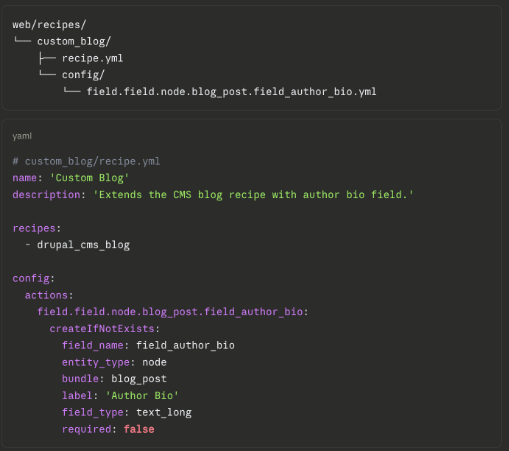
This pattern extends, don't fork is the idiomatic Drupal CMS approach.
The old Distribution model had a fundamental flaw: once a distribution was applied, its modules and configuration became entangled with the site. Updating the upstream distribution (or the site itself) was treacherous. Many agencies simply forked distributions and maintained them in isolation.
Recipes solve this cleanly:
The tradeoff is that recipes have no update path today. If the upstream drupal_cms_blog recipe changes significantly, you won't automatically get those changes on existing sites — you'll need to manually apply config updates. The community is actively working on a recipe update mechanism, and it will be a significant discussion at DrupalCon Rotterdam.
The Drupal CMS track at Rotterdam will focus heavily on production experiences and the road ahead. As you plan your conference schedule, keep an eye for sessions covering:
Drupal CMS 2.x and the Recipe system represent a genuine paradigm shift in how Drupal sites are built and maintained. The key takeaways for developers heading to Rotterdam:
Drupal CMS 2.x isn't just a new version. It's the platform finally shipping a site-building experience that matches what the rest of the CMS world has expected for years, with the enterprise foundation underneath that has always made Drupal worth choosing.
This post is part of the "Drupal in Rotterdam" series — 10 technical deep-dives published ahead of DrupalCon Europe 2026. Follow along for weekly posts through September.
All of the topics covered in this series — Recipes, Canvas, AI integration, accessibility, DevOps, and more — will be front and centre at DrupalCon Europe 2026 in Rotterdam, 28 September – 1 October 2026.
👉 Register for DrupalCon Rotterdam 2026
- Article by Iwantha Lekamge